Almost three years ago I announced Discord-RSS, a self-hosted bot for sharing RSS feeds in Discord. It worked great. But running two services just to post a link in Discord? That was one service too many.
Say hello to v2. Still Node.js, Svelte-Kit, and Auth.js, but simpler to run and a lot nicer to manage.
One Service Instead of Two
v1 had two moving parts: the web UI and a Node.js runner. Two deploys, two processes, two things to babysit. In v2 the RSS poller runs right inside the web server. One app. One start command. One thing to restart. Local dev even follows the same rules as production, so no more surprises.
Wait, so I can just delete my runner service?
Yes sir. Actually, you have to. More on that below.
One Webhook for Every Feed
v1 bragged about posting each feed to any channel webhook. In practice, every feed I ran went to the same channel. So v2 keeps it simple and posts everything to one DISCORD_WEBHOOK_URL environment variable. This also keeps the webhook secure in the runtime and not on the front-end.
Discord rate-limiting you? It waits and retries (HTTP 429) instead of dropping the post. And your webhook URL stays out of the error logs where it belongs.
A Better Web Management UI
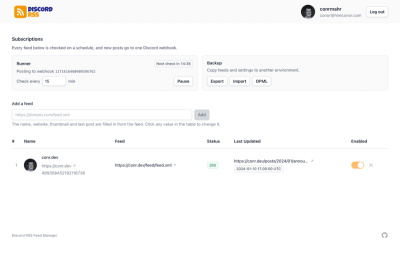
The web UI got the biggest glow-up, rebuilt with Svelte 5 and TailwindCSS v4:
- Feed discovery: paste a feed URL and it fills in the name, website, thumbnail, and latest post for you.
- Inline editing: edit feeds right in the table instead of a separate form.
- Status at a glance: HTTP status badges show which feeds are healthy, misconfigured, or timing out, and a countdown shows when the next poll runs.
- Pause and Resume: set the poll interval and start or stop the runner from the UI. New installs start paused, so nothing posts until you're ready.
User Mentions in Posts
Still here, now with friends. Since v1.4, a feed can list multiple Discord IDs, so team blogs can ping everyone when a post is shared.

Smarter Polling
One broken feed used to be everyone's problem. Not anymore. The poller handles errors per feed, compares dates to the minute, and deduplicates posts by URL, so you won't see the same post twice.
Export and Import
Moving from staging to production? Or from v1 to v2? Export downloads every feed, its progress, and your settings as one JSON file. Import loads it into the other environment, and it even accepts your old v1 data. Just want your subscriptions? OPML export has been around since v1.3.
Upgrading from v1
- Set
DISCORD_WEBHOOK_URLbefore deploying. Feeds aren't checked without it. - Remove the separate runner service.
- Deploy. Feeds move to the new storage layout automatically on first start, and the old data is kept in Redis as a
v1-backupkey. - Set the interval and click Resume. The runner starts paused after upgrading.
Important: Don't point your old runner service at the web server instead of removing it. Both will poll and every post gets sent twice. Webhook URLs saved on old feeds are also dropped, so make sure that one webhook is the channel you want.[1]
Open-Sourced
Still free. Still available to anyone! Self-host it and get it integrated with your own Discord server. Bug issues and features are welcomed too. Check it out:
"conrmahr/discord-rss: Upgrading to v2". Retrieved October 16, 2026. ↩︎